What are domain, nameserver, and DNS?
2023-04-12
domain, nameserver, and DNS
When you visit a website, there’s a lot going on behind your computer until you actually view the website.
In this post, you will learn the process of DNS resolution in detail and will also get a grasp on networking-related protocols/terms such as domain, nameserver, DNS, IP address, and so forth.
Let’s check some of the technical definitions and then see how they work together with an example.
-
A domain (domain name) is the human readable name of a website; e.g., google.com, github.com, facestyling.click
- Nameservers resolve (translate) the domain of a website into a machine readable IP address; e.g., 192.168.1.7
- DNS (Domain Name System) is a system in nameservers, having hundreds of thousands of DNS servers that transmit DNS queries & responses between clients and nameservers.
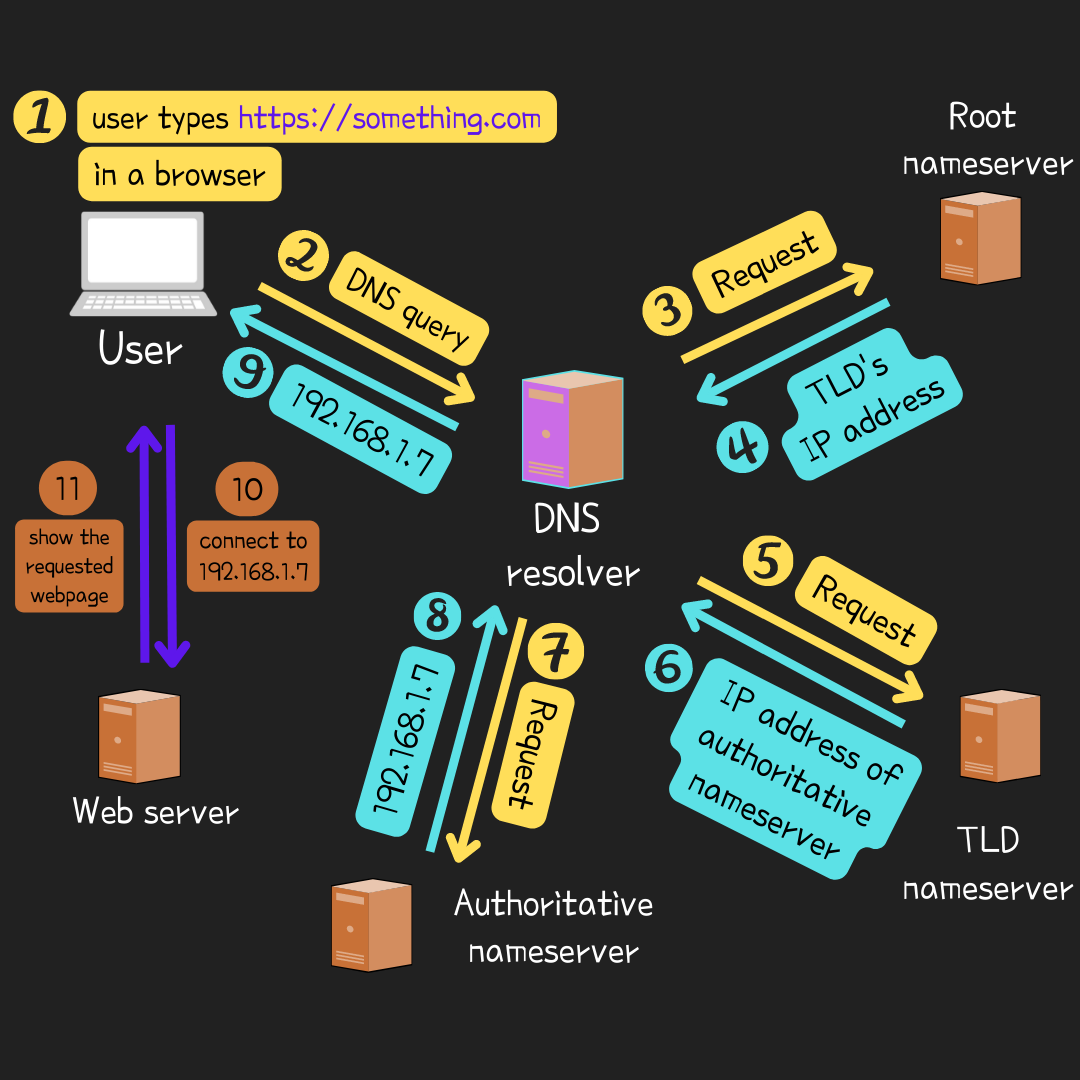
Say, you type e.g., https://something.com in a browser.
The DNS resolver (a DNS server) takes the query something.com and points it to the root nameserver. The root nameserver responds to the DNS resolver by returning the IP address of a TLD nameserver containing the information of .com.
With that IP address, the DNS resolver queries to the TLD nameserver where returns the IP address of an authoritative nameserver containing the information of something to the DNS resolver.

The DNS resolver then queries to the authoritative nameserver’s IP address, and it returns a complete IP address e.g., 192.168.1.7, that is, in general, the IP address of a web server hosting the requested website, to the DNS resolver.
Finally, the DNS resolver forwards the IP address 192.168.1.7 to the client (your computer) and the client’s browser gets connected to a web server with the IP where returns and displays the webpage at https://something.com/
In the step 9 of the picture above, the IP address is cached (saved in temporary) in case it can be reused on the same request from a client without having to query to nameservers over and over again.
In turn, each nameserver only takes one query at a time and tells the DNS resolver the next nameserver it can query to.
https://something.com➜.com➜something➜ IP address e.g.,192.168.1.7➜ web page forsomething.com
HTTPS
You have probably a lot seen https:// in front of any domain and let’s brefly go through what it is.
HTTPs, short for Hypertext Transfer Protocol Secure, is the HTTP (Hypertext Transfer Protocol) over SSL (Secure Socket Layer)/TLS (Transport Layer Security) protocol.
HTTPs encrypts data communication on the Internet more securely than HTTP does, and you will seldom see insecure websites with HTTP these days.
Say, you visit a website with HTTP in a web browser like Chrome and the browser will show a warning flag displaying Not Secure in front of the domain; e.g., Not secure http://example.com/.
Because any HTTP websites are vulnerable to many different cyber attacks such as Sensitive Data Exposure, Cross-Site Scripting, Broken Authentication, MITM (Man in the Middle) attack, and more; see OWASP Top Ten.
Thus, using HTTPs for website is the essential, not just a recommendation!


