what is if-else statement?
2023-05-14
if-else statement is one of the most widely used conditional statements in most programming languages to execute a certain action in (a task of) a program.
what is if statement?
In JS, you can do a conditional test to make a decision (write a decision code) with if statement.
if ( condition ) { do something here }
ifis a reserved keyword for its statement declaration (and it’s the same in most programming languages).ifstatement must contain a condition in parentheses(), and it should open and close curly brackets{}that is a block your decision (code) goes to.
In general, if statement is used with logical operators such as AND &&, equal to ==/===, OR ||, and so forth. There are plenty of practical examples you can learn about the basic syntax of JS operators.
In this post, we are going through a little complex but interesting scenario focusing on if-else statement with the OR operator ||.
toggleBtn()
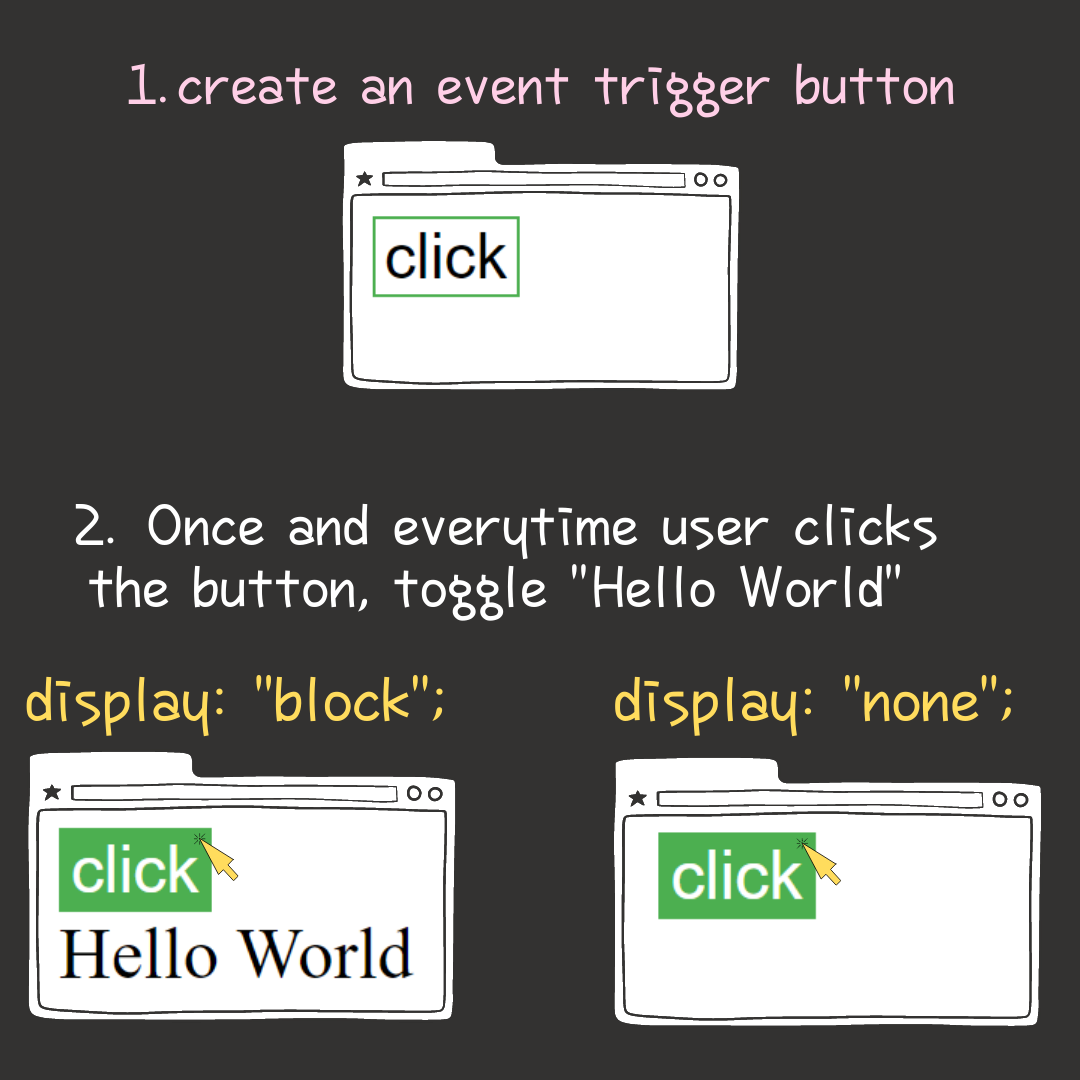
The code snippets above implement a toggle button that shows or hides the text “Hello World” every time user clicks the toggle button.
On clicking the toggle button in index.html, the function toggleBtn() in my.js is called and the variable toggler is given an access to the target element with id="myId" where contains the text content “Hello World”.
That means, this is when toggler can toggle/manipulate a display (visibility) state of “Hello World” in the target element using if-else statement and the OR operator ||, and let’s get into how they work together in the function toggleBtn().
toggleBtn(); if statement and the OR operator ||
As mentioned earlier, if statement consists of an expression (condition) and a decision block, which fairly correspond to if cluse and main clause of the 1st conditional in English respectively.
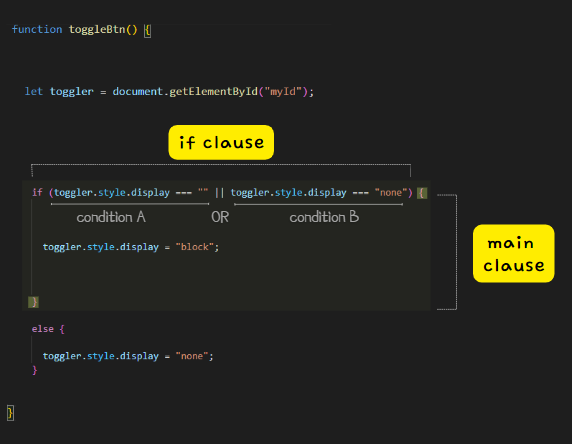
Within if clause, the OR operator || returns a boolean value TRUE if either or both operands is/are TRUE. Otherwise, it returns FALSE.
Now, let’s verify what that means by having a close look at each of the conditions.
if (toggler.style.display === "" || toggler.style.display === “none”)
toggleris an instance of the target element<div id="myId">Hello World</div>having an access to the element; see the in-page commentary and/or HTML DOM method.toggler.style
toggleraccesses itsstyleattribute, which is a CSSStyleDeclaration object having a list of all style properties.toggler.style.display
togglerthen further accesses a value of the propertydisplayin its inlinestyleattribute.toggler.style.display === ""
===is a strict equality operator that checks whether its two operands are equal.
It checks if adisplayvalue of thestyleattribute intoggleris equal to an empty value"".
Taken all together, the 1st condition if (toggler.style.display === "") means “Is it TRUE that the value of toggler.style.display is equal to an empty value "" (no value in it)?”.
Why does the 1st condition check an empty value "" of toggler.style.display?
The target element <div id="myId">Hello World</div> where accessed by toggler, initially has no inline css style attribute and display property in it (meaning that it literally has no style configuration to manipulate a display state of its content “Hello World”), but has an external css code #myId {display: none;} making the text content “Hello World” hidden instead.
Thus, if the 1st condition toggler.style.display === "" returns TRUE, it is absolutely sure that:
toggleraccessing<div id="myId">Hello World</div>finds that the element has an empty value""for its display property. (That means, it doesn’t have anystyleattribute anddisplayproperty in it.)- “Hello World” is still being hidden by the external css.
The OR operator || then skips an execution of the 2nd condition, and a decision code toggler.style.display = "block"; showing Hello World” in browser is executed in the main clause; the if statement block within curly brackets {}.
In other words, the decision code toggler.style.display = "block"; adds (assigns) an inline style attribute with a property-value pair "display: block;" into the target element with id="myId".
At the same time, the initial external css code that has been set for the same target element is canceled (ignored).
if (toggler.style.display === “” || toggler.style.display === "none")
Let’s move on to the 2nd condition toggler.style.display === "none" in the parenthesis () of if clause.
The logic is the same as the 1st condition except that the 2nd one looks for an actual value "none" that is the property display’s value in inline style attribute of the target element with id="myId" where accessed by toggler.
That means, when the 2nd condition toggler.style.display = "none" is read (executed) in if clause, it accesses the target element, and what it only checks is a state of the inline style attribute with "display: none;" that hides the content Hello World” in the element.
Because, if Hello World” is hidden in browser before clicking the toggle button, that’s when the 1st condition in if clause is executed on/after clicking the button. If the 1st condition returns FALSE then, that means Hello World” is still hidden.
The if statement (the JS program) via the OR operator || then moves to and executes the 2nd condition toggler.style.display === "none" to see if it’s TRUE that the display’s value in style attribute of the target element with id="myId" is set to style="display: none;" (hidden).
Thus, if the 2nd condition returns TRUE in if clause, the same decision code toggler.style.display === "block" in main clause is executed to show Hello World” in browser.
toggleBtn(); else statement
When using else statement, it must be used after if statement, as opposed to if statement that can be used alone multiple times.
In general, you want to put into else statement something opposite to a decision code used in if statement block, as else statement doesn’t allow any condition. Thus, it’s best practice to write and use as simple & clear code as possible -to avoid excessive use of endless inner if statements- in an else statement.
In the if statement earlier, we’ve coded “Hello World” in the target HTML element with id="myId" to become visible (shown) using the decision code toggler.style.display = "block"; when user clicks the toggle button.
Like so, on clicking the button again (unless forcing a page refresh), we want “Hello World” to become invisible (hidden) to browser using the opposite decision code toggler.style.display = "none"; in the else statement block.