what is switch statement?
2023-05-26
what is switch statement?
switch statement is a conditional statement in JS (and in most programming languages) to execute a certain action over multiple inner blocks called case.
switch takes an expression (input condition) that looks for a match case by comparing its value with the values defined in each case.
 switch (expression) {
    case a:
      // code block
      break;

    case b:
      // code block
      break;

    case c:
      // code block
      break;

    default:
      // code block
      break;
  }
- if there’s a match, switch returns (executes) the associated code in the match
case. - if there’s no match, switch returns the default
case.
switch statement; example 1
Let’s have a look at an example.
The following is a block of codes in JS that alerts a matching case (matching number) in browser, given that expression in switch statement is a random number generated between 0, 1, and 2.
let match = Math.floor(Math.random() * 3); //a random integer from 0 to 2
let a=0,b=1,c=2; //case a, b, and c

switch (match) {
  case a:
    alert("I got number " + a);
    break;

  case b:
    alert("I got number " + b);
    break;

  case c:
    alert("I got number " + c);
    break;

  default:
    alert("no match found");
    break;
}
The code match = Math.floor(Math.random() * 3); first generates a random number within its range and the variable match is ready as an expression.
The expression (match) in switch statement then looks for a match by comparing its value with each case and returns the associated code in a match case as seen below.


The key logic behind switch statement is the strict equality operator === which checks whether its two operands are equal in value & type. That means, switch is an equal to statement specialized in checking an equality (match) between expression and multiple case clauses to make different decisions.
The example switch statement above can be explained as multiple if statements with the strict equality operator ===.
Both of the statements do the same job looking for an equality (match), and it’s seen that switch statement simplifies process, as opposed to if statement going verbose relatively. However, either way is still fine as it’s mere a few case clauses in switch statement (, and if-elseif-else clauses in if statement) only.
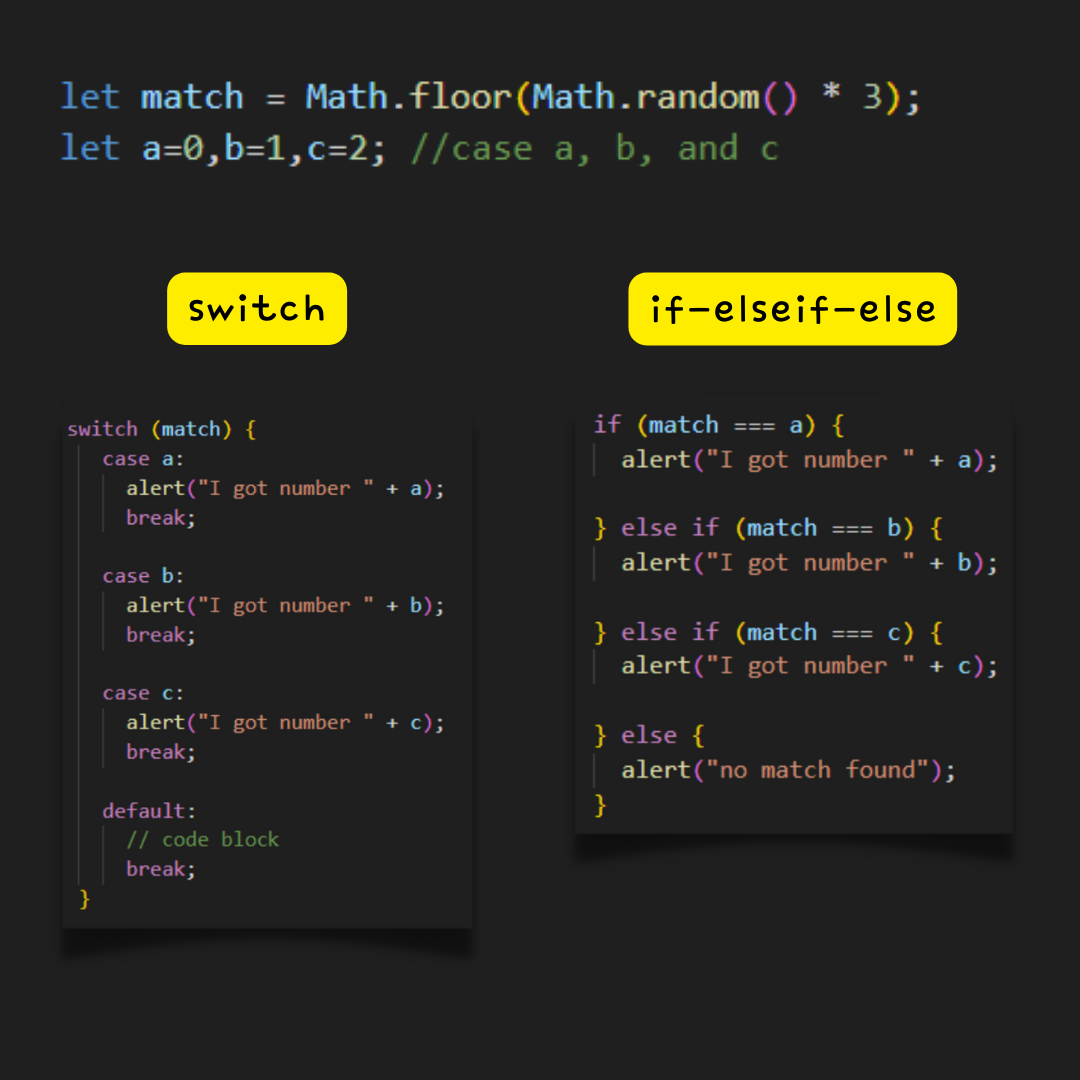
What if considering different actions/decisions (more than 5+)? You probably don’t want to or have to go for if statement.
switch statement will execute different decision codes -one at a time- only if an expression (input condition) finds a match across multiple target case clauses (target conditions).
switch statement doesn’t only simplify process and readability, but also delivers faster performance.

To sum up, all of conditional statements in JS take an expression (input condition).
switchstatement is anequal tostatement with the built-in strict equality oeprator===for multiple target condition comparisons in type & valueifstatement is an all-round conditional statement working with many different logical operators for single or multiple target condition comparisons.read more on what is if-else statement?
switch statement; example 2
facestyling.click is a face shape recognition web application that suggests fashion/accessory items by AI-analyzing face shape of an input image among oval, round, long, square, and triangle in percentage.
To deliver users different fashion item recommendations depending on face shape results the AI analyzes, switch statement performs a significant role.
Say, you upload a face image to the input form and then the AI trained with a number of face images predicts the best matching face shape for the input image at runtime.
After that, based on the prediction data the AI returns, switch statement looks for and returns a match case in multiple case clauses where contain pre-defined fashion/accessory recommendations by face shape.


